


Page 87 - RAYCOH-SENSORS-2026EN
P. 87
Teach-in function                                    Teach-in function

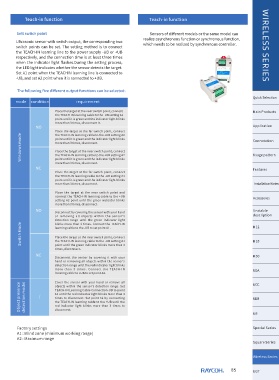
        Sett switch point                                        Sensors of different models or the same model can
                                                              realize asynchronous function or synchronous function,
        Ultrasonic sensor with switch output, the corresponding two
        switch  points  can  be  set.  The  setting  method  is  to  connect   which needs to be realized by synchronous controller.  WIRELESS SERIES
        the TEACH-IN learning line to the power supply -UB or +UB
        respectively, and the connection time is at least three times
        when  the  indicator  light  flashes.During  the  setting  process,
        the LED light indicates whether the sensor detects the target.
        Set A1 point when the TEACHIN learning line is connected to
        -UB, and set A2 point when it is connected to +UB.


        The following five different output functions can be selected:
                                                                                                             Quick Selection
        mode  condition           requirement
                         Place the target at the near switch point,connect                                   Main Products
                         the TEACH-IN learning cable to the -UB setting A1
                         point until it is green and the indicator light blinks
                         more than 3 times, disconnect it.
                NO                                                                                           Application
                         Place  the  target  at  the  far  switch  point,  connect
          Windows mode   more than 3 times, disconnect.                                                      Connotation
                         the TEACH-IN learning cable to the +UB setting A2
                         point until it is green and the indicator light blinks

                         Place the target at the near switch point, connect
                                                                                                             Usage pattern
                         the TEACH-IN learning cable to the +UB setting A2
                         point until it is green and the indicator light blinks
                         more than 3 times, disconnect.
                NC                                                                                           Features
                         Place  the  target  at  the  far  switch  point,  connect
                         the TEACH-IN learning cable to the -UB setting A1
                         point until it is green and the indicator light blinks
                         more than 3 times, disconnect.                                                      Installation Notes
                         Place  the  target  at  the  near  switch  point  and
                         connect  the  TEACH-IN  learning  cable  to  the  +UB                               Accessores
                         setting  A2  point  until  the  green  indicator  blinks
                         more than 3 times, disconnect.
                NO                                                                                           Unstable
                        Disconnect by covering the sensor with your hand
                        or  removing  all  objects  within  the  sensor's                                    description
                        detection  range  until  the  green  indicator  light                                M12
          Switch Mode   learning cable to the -UB to set point A1.                                           M18
                        blinks  more  than  3  times.  Connect  the  TEACH-IN

                        Place the target at the near switch point, connect
                        the TEACH-IN learning cable to the -UB setting A1
                        point until the green indicator blinks more than 3
                        times, disconnect.
                NC                                                                                           M30
                        Disconnect  the  sensor  by  covering  it  with  your
                        hand  or  removing  all  objects  within  the  sensor's
                        detection range until the red indicator light blinks
                        more  than  3  times.  Connect  the  TEACH-IN                                        SOD
                        learning cable to +UB to set point A2.                                               SRE

                        Cover  the  sensor  with  your  hand  or  remove  all
         Object presence   detection model  objects  within  the  sensor's  detection  range.  Set           SDB
                        TEACH-IN Learning Cable Connection-UB to point
                        A1 until the red indicator light blinks more than 3
                        times  to  disconnect.  Set  point  A2  by  connecting
                        the TEACH-IN learning cable to the +UB until the
                        red  indicator  light  blinks  more  than  3  times  to
                        disconnect.
                                                                                                             SR


        Factory settings                                                                                     Special Series
        A1 : Blind zone (minimum working range)
        A2 : Maximum range
                                                                                                             Square Series

                                                                                                             Wireless Series


                                                                                                    85       SGT

